release 2026-06-06
GTFSwizard is a set of tools for creating, exploring, and manipulating General Transit Feed Specification (GTFS) files in R.
Its main purpose is to provide researchers and practitioners with a seamless and easy way to visually explore and simulate changes within GTFS files, which represent public transportation schedules and geographic data. The package allows users to filter data by routes, trips, stops, and time, generate spatial visualizations, and perform detailed analyses of transit networks, including headway, dwell times, route frequencies, travel times, corridors and hubs. Editing functions to delay, speed change, and split trips, and to merge distinct GTFS are available. This is an ongoing work and new features are planned to be implemented soon.
The development version and the CRAN version are currently both 1.1.1.
# CRAN version:
install.packages("GTFSwizard")
library(GTFSwizard)
# Development version (currently identical to CRAN):
install.packages('remotes') # if not already installed
remotes::install_github('OPATP/GTFSwizard@main')
library(GTFSwizard)
Use read_gtfs() to read an existing feed, as_wizardgtfs() to convert a GTFS list, and create_gtfs() to build and validate a feed from data frames. Each function returns a wizardgtfs object.
library(GTFSwizard)
gtfs <- GTFSwizard::read_gtfs('path-to-gtfs.zip') # or
gtfs <- GTFSwizard::as_wizardgtfs(gtfs_obj)
created_gtfs <- GTFSwizard::create_gtfs(
agency = data.frame(
agency_id = "A", agency_name = "Demo Transit",
agency_url = "https://example.com",
agency_timezone = "America/Fortaleza"
),
routes = data.frame(
route_id = "R1", agency_id = "A", route_short_name = "1",
route_long_name = "Central", route_type = 3
),
trips = data.frame(route_id = "R1", service_id = "WK", trip_id = "T1"),
stop_times = data.frame(
trip_id = "T1", arrival_time = c("08:00:00", "08:10:00"),
departure_time = c("08:00:00", "08:10:00"),
stop_id = c("S1", "S2"), stop_sequence = 1:2
),
stops = data.frame(
stop_id = c("S1", "S2"), stop_name = c("First", "Second"),
stop_lat = c(-3.73, -3.74), stop_lon = c(-38.52, -38.53)
),
calendar = data.frame(
service_id = "WK", monday = 1, tuesday = 1, wednesday = 1,
thursday = 1, friday = 1, saturday = 0, sunday = 0,
start_date = "20260101", end_date = "20261231"
)
)
summary(for_bus_gtfs)
# <summary.wizardgtfs>
# Agency: ETUFOR
# Service: 2019-09-13 to 2021-12-13 (823 active dates)
# 345 routes; 85410 trips; 4676 stops; 675 shapes
# Median consecutive-stop spacing: 268.2 m
#
# Tables:
# agency calendar calendar_dates fare_attributes fare_rules
# 1 3 6 2 345
# routes shapes stop_times stops trips
# 345 125776 2659737 4676 85410
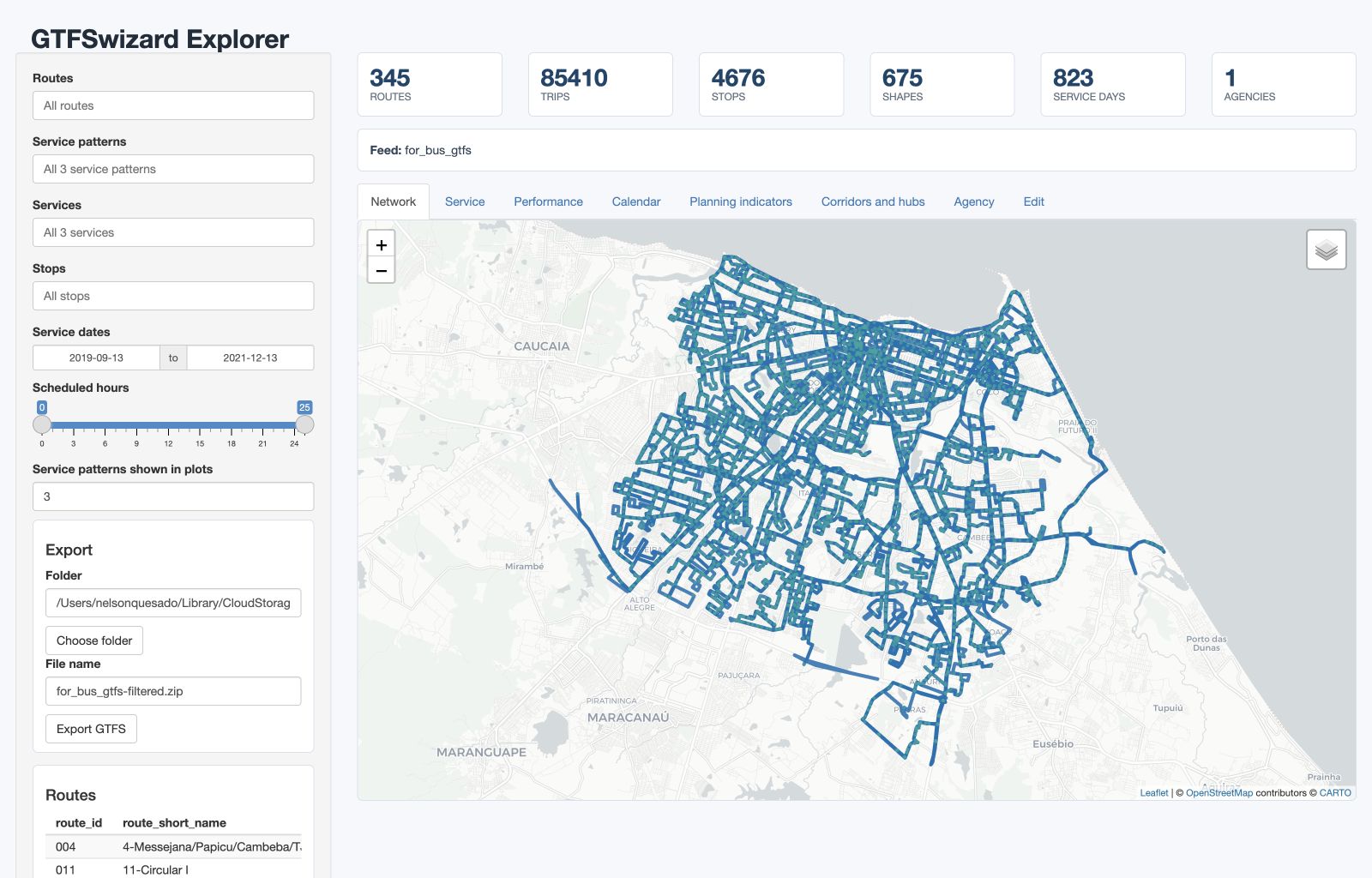
explore_gtfs() opens an interactive dashboard with maps and planning and operational views. Omit the argument to choose a GTFS .zip file in a browse window.
GTFSwizard::explore_gtfs(for_bus_gtfs)
GTFSwizard::explore_gtfs()

The concept of a service_pattern in GTFSwizard helps to address a common limitation of GTFS: its lack of a standardized way to distinguish distinct service patterns within the same route. GTFS files can have multiple service_ids for trips within the same route on the same day, such as regular and extra services. However, GTFS does not inherently identify unique service patterns, i.e. unique set of service_ids.
In wizardgtfs objects, the dates_services table is an extended feature that consolidates dates and associated service_ids into a single, organized table. This table is not standard in typical GTFS files but is added specifically in wizardgtfs objects. The dates_services table is structured so that each date is associated with a list of service_ids representing the transit services operating on that specific day. Essentially, each unique list of service_ids observed across dates defines a distinct service pattern. It is common to observe at least 3 service patterns: weekdays, saturdays and sundays.
dates_services: Each date in the dates_services table has an associated list of service_ids, capturing the set of services active on that particular day.service_pattern is identified by a unique combination of service_ids operating on a given date. For instance, if two dates share the exact same service_ids, they are considered part of the same service_pattern.You can check service_pattern using the get_servicepattern() function.
GTFSwizard::get_servicepattern(for_bus_gtfs)
## A tibble: 3 × 3
# service_id service_pattern pattern_frequency
# <chr> <chr> <int>
#1 U servicepattern-1 586
#2 D servicepattern-2 121
#3 S servicepattern-3 116
Most of the functions will account for service_patterns, e.g. get_frequency() and plot_routefrequency(). The former arrange service_pattern from most frequent (typical day) to less frequent (rarer day), while the latter highlights the most frequent service pattern.
GTFSwizard::get_frequency(for_bus_gtfs)
## A tibble: 1,763 × 5
# route_id direction_id service_pattern pattern_frequency daily.frequency
# <chr> <dbl> <chr> <int> <int>
#1 004 0 servicepattern-1 586 22
#2 004 1 servicepattern-1 586 23
#3 011 1 servicepattern-1 586 95
#4 011 1 servicepattern-2 121 43
#5 011 1 servicepattern-3 116 73
#6 012 0 servicepattern-1 586 102
## ℹ 1,757 more rows
## ℹ Use `print(n = ...)` to see more rows
GTFSwizard::plot_routefrequency(for_bus_gtfs, route = for_bus_gtfs$routes$route_id[3])

You can use plot_calendar() to check the number of trips along the calendar and get a better sense of the service_pattern rationale.
GTFSwizard::plot_calendar(for_bus_gtfs)

Frequency, headways, dwell times, speeds, durations, distances, fleet requirements, first departures, corridors, and hubs can be calculated directly from the schedule. Several functions support aggregation methods such as by.trip, by.route, by.hour, and detailed; see each function’s help page for its exact observational unit.
GTFSwizard::get_headways(for_bus_gtfs, method = 'by.hour')
## A tibble: 73 × 5
# hour service_pattern pattern_frequency headway_minutes valid_trips
# <dbl> <chr> <int> <dbl> <int>
#1 0 servicepattern-1 586 11.6 8
#2 0 servicepattern-2 121 11.6 8
#3 0 servicepattern-3 116 11.6 8
#4 1 servicepattern-1 586 64.4 32
#5 1 servicepattern-2 121 64.4 32
#6 1 servicepattern-3 116 64.4 32
## ℹ 67 more rows
## ℹ Use `print(n = ...)` to see more rows
GTFSwizard::get_durations(for_bus_gtfs, method = 'detailed', trips = 'all')
GTFSwizard::get_distances(for_bus_gtfs, method = 'by.trip', trips = 'all')
GTFSwizard::get_distances(for_bus_gtfs, method = 'by.route', trips = 'all')
GTFSwizard::get_speeds(for_bus_gtfs, method = 'by.route', trips = 'all')
GTFSwizard::get_fleet(for_bus_gtfs, method = 'peak')
GTFSwizard::get_1stdeparture(for_bus_gtfs)
Corridors and hubs are simplified representations of critical links and nodes on transit networks.
get_corridor() and plot_corridor() functions retrieves and visualizes high-density transit sections.GTFSwizard::get_corridor(for_bus_gtfs, i = .01, min.length = 1500)
# Simple feature collection with 4 features and 4 fields
# Geometry type: MULTILINESTRING
# Dimension: XY
# Geodetic CRS: WGS 84
# # A tibble: 4 × 5
# corridor stop_id trip_id length geometry
# <chr> <list> <list> <dbl> <MULTILINESTRING [°]>
# 1 Corridor 1 <chr [7]> <chr [3,429]> 2851. ((-38.48122 -3.781901, ...)
# 2 Corridor 2 <chr [5]> <chr [2,504]> 2214. ((-38.54677 -3.731971, ...)
# 3 Corridor 3 <chr [5]> <chr [3,470]> 2089. ((-38.48102 -3.782528, ...)
# 4 Corridor 4 <chr [7]> <chr [3,104]> 1635. ((-38.55838 -3.780695, ...)
GTFSwizard::plot_corridor(for_bus_gtfs)

get_hubs() and plot_hubs() functions retrieves and visualizes high-density transit stops.GTFSwizard::get_hubs(for_bus_gtfs)
# Simple feature collection with 4676 features and 5 fields
# Geometry type: POINT
# # A tibble: 4,676 × 6
# stop_id trip_id route_id n_trip n_routes geometry
# <chr> <list> <list> <int> <int> <POINT [°]>
# 1 6079 <chr [14,745]> <chr [65]> 14745 65 (-38.48476 -3.738568)
# 2 4030 <chr [6,405]> <chr [62]> 6405 62 (-38.50203 -3.830385)
# 3 6083 <chr [15,578]> <chr [56]> 15578 56 (-38.56358 -3.775878)
# 4 5822 <chr [14,364]> <chr [52]> 14364 52 (-38.58683 -3.789329)
# 5 1717 <chr [4,252]> <chr [43]> 4252 43 (-38.5345 -3.735906)
# 6 6449 <chr [4,252]> <chr [43]> 4252 43 (-38.53651 -3.738107)
## ℹ Use `print(n = ...)` to see more rows
GTFSwizard::plot_hubs(for_bus_gtfs)

Filtering tools allows customization of GTFS data by service patterns, specific dates, service IDs, route IDs, trip IDs, stop IDs, and time ranges. These filter_ functions help retain only the relevant data, making analysis easier and more focused.
filter_servicepattern(): Filter by specified service patterns. Defaults to the most frequent pattern (typical day) if none is provided.filter_date(): Filter data by specific dates, returning only services active on those dates.filter_service(): Filter by specific service IDs to retain.filter_route(): Filter by route ID. Set keep = TRUE to retain specified routes or keep = FALSE to exclude them.filter_trip(): Filter by trip ID. Set keep = TRUE to retain specified trips or keep = FALSE to exclude them.filter_stop(): Keep stop calls at the requested stop IDs. Trips may remain partial, which supports route and network experiments.filter_time(): Keep stop calls inside a specified time range (from and to). Trips that cross the time boundary remain as partial trips.# Filter by service pattern
filtered_gtfs <- GTFSwizard::filter_servicepattern(for_bus_gtfs, "servicepattern-2")
# Filter by specific date
filtered_gtfs <- GTFSwizard::filter_date(for_bus_gtfs, "2023-01-01")
# Filter by route ID, retaining only specified routes
filtered_gtfs <- GTFSwizard::filter_route(for_bus_gtfs, for_bus_gtfs$routes$route_id[1:2])
# Filter by trip ID, excluding specified trips
filtered_gtfs <- GTFSwizard::filter_trip(for_bus_gtfs, for_bus_gtfs$trips$trip_id[1:2], FALSE)
# Filter by time range
filtered_gtfs <- GTFSwizard::filter_time(gtfs = for_bus_gtfs, "06:30:00", "10:00:00")
# Spatial filter using filter_stop
spatial.filter <- GTFSwizard::get_shapes_sf(for_bus_gtfs$shapes)
stops <- sf::st_filter(GTFSwizard::get_stops_sf(for_bus_gtfs$stops),
spatial.filter) |>
dplyr::pull(stop_id)
filtered_gtfs <- GTFSwizard::filter_stop(for_bus_gtfs, stops)
selection() records a subset or grouping without removing any GTFS rows. Bare columns create groups in a style similar to dplyr::group_by(), while logical expressions restrict the records represented by the selection metadata.
# One group for each route and direction
grouped_gtfs <- GTFSwizard::selection(
for_bus_gtfs,
route_id,
direction_id
)
# Group selected routes without modifying the original GTFS tables
selected_gtfs <- GTFSwizard::selection(
for_bus_gtfs,
route_id,
route_id %in% for_bus_gtfs$routes$route_id[1:3]
)
attr(selected_gtfs, "selection")$groups
selected_gtfs <- GTFSwizard::unselection(selected_gtfs)
GTFSwizard provides consistent static plots for network supply and scheduled operations. Plot subtitles and axes state the observational unit represented.
plot_frequency() shows the distribution of trip frequencies by hour, with hourly and overall averages to highlight peak service times.
GTFSwizard::plot_frequency(for_bus_gtfs)

plot_routefrequency() displays frequency by hour for selected routes, illustrating different service patterns.
GTFSwizard::plot_routefrequency(for_bus_gtfs, route = for_bus_gtfs$routes$route_id[4:5])

plot_headways() shows average time between trips, highlighting hourly and overall headways to visualize service intervals.
GTFSwizard::plot_headways(for_bus_gtfs)

plot_servicespan() shows the first departure and final arrival for each route-service pattern, plot_serviceheatmap() summarizes departures by weekday and hour, plot_routeduration() shows scheduled trip-duration distributions, and plot_servicesupply() reports scheduled vehicle-hours.GTFSwizard::plot_servicespan(for_bus_gtfs)
GTFSwizard::plot_serviceheatmap(for_bus_gtfs)
GTFSwizard::plot_routeduration(for_bus_gtfs)
GTFSwizard::plot_servicesupply(for_bus_gtfs)


GTFSwizard provides functions to edit GTFS data directly.
The delay_trip() function allows users to apply a delay to specific trips.
The split_trip() function equally divides a trip in split number of points, creating split + 1 separate trips. This can be useful for analyzing partial routes or for simulating route adjustments.
The edit_speed() function adjusts the travel speeds between stops in a GTFS dataset by modifying trip durations based on a specified speed multiplier. It allows selective adjustments for specific trips and stops or applies changes globally.
The set_dwelltime() function overwrites dwell times preserving start time and end time of trips. The edit_dwelltime() function edit dwell times adjusting the total duration of trips.
The merge_gtfs() function combines two GTFS files, allowing for the integration of distinct GTFS datasets into a single dataset.
# Delay trips by 5 minutes (300 seconds)
delayed_gtfs <- GTFSwizard::delay_trip(for_bus_gtfs, trip_id = for_bus_gtfs$trips$trip_id[1:2], delay = 300)
# Split a trip in 3 sections (2 splits)
split_gtfs <- GTFSwizard::split_trip(for_bus_gtfs, trip_id = for_bus_gtfs$trips$trip_id[1:2], split = 2)
# Merge two GTFS files into one
merged_gtfs <- GTFSwizard::merge_gtfs(for_bus_gtfs, for_rail_gtfs)
# Double the speed of all trips
faster_gtfs <- GTFSwizard::edit_speed(for_rail_gtfs, factor = 2)
# Set and edit dwell times for specific trips
gtfs <- set_dwelltime(for_rail_gtfs,
trips = for_rail_gtfs$trips$trip_id[1:100],
stops = for_rail_gtfs$stops$stop_id[1:20],
duration = 10)
gtfs <- edit_dwelltime(gtfs,
trips = for_rail_gtfs$trips$trip_id[1:100],
stops = for_rail_gtfs$stops$stop_id[1:20],
factor = 1.5)
get_dwelltimes(gtfs, method = 'detailed')
Feeds are, then, exported using the write_gtfs() function. It saves a standard GTFS .zip file, located as declared.
GTFSwizard::write_gtfs(for_bus_gtfs, 'path-to-file.zip')
GTFSwizard implements the tidytransit::raptor() algorithm that estimates travel time matrices from a wizardgtfs object and a few other arguments.
GTFSwizard::tidy_raptor(for_rail_gtfs, min_departure = '06:20:00', max_arrival = '09:40:00',
dates = "2021-12-13", max_transfers = 2, keep = "all",
stop_ids = '66')
GTFSwizard autodetects and reconstructs missing shape tables using the get_shapes() function. Variations of this function can create simple feature objects from stops or shapes tables, using get_stops_sf() or get_shapes_sf() functions, or standard GTFS shapes data frames from simple-feature shape objects using get_shapes_df(). Because get_shapes() reconstructs geometry from stop sequences, shapes created after filter_stop() or filter_time() describe only the retained partial trips.
gtfs <- for_bus_gtfs
gtfs$shapes <- NULL
gtfs$shapes
#NULL
gtfs <- GTFSwizard::get_shapes(gtfs)
GTFSwizard::get_shapes_sf(for_bus_gtfs$shapes)
GTFSwizard::get_stops_sf(for_bus_gtfs$stops)
The latlon2epsg() function determines the appropriate UTM (Universal Transverse Mercator) EPSG code for a given sf object based on its centroid’s latitude and longitude. This can be very useful for conveniently geoprocessing data in meters.
GTFSwizard::latlon2epsg(get_shapes_sf(for_bus_gtfs)$shapes)
GTFSwizard features two toy examples, a small for_rail_gtfs wizardgtfs object, and a rather bigger for_bus_gtfs wizardgtfs object. They are real GTFS samples, the first being the urban subway system, and the second one the regular bus system; both for the city of Fortaleza, Brazil, on the 2020’s.
gtfs <- GTFSwizard::for_bus_gtfs
plot(gtfs)

The functions described facilitate the analysis, simulation, and evaluation of public transportation systems. They assist the replication of real-world transit interventions, enabling researchers, planners, and policymakers to test and refine system modifications in a controlled and efficient manner. Key applications are outlined below along with their potential uses in addressing typical challenges and opportunities in public transit systems.
Bus Rapid Transit (BRT) and Exclusive Lanes: BRT systems often rely on exclusive
corridors to reduce travel times and enhance reliability. Using edit_speed(), users can
represent changes towards smaller travel times on these corridors by adjusting travel
speeds. In addition, edit_dwelltime() allows the representation of optimized boarding
and alighting processes, reflecting reduced dwell times at stations due to level boarding,
pre-payment mechanisms, or increased operational efficiency;
Frequency Modifications: Frequency adjustments are among the most common transit
interventions. By using filter_trip() to select trips to be doubled, delay_trip() to
change its first departure_time, and merge_gtfs() to add them to the original GTFS,
users can represent increased frequencies, reflecting higher service levels. Conversely,
filter_trip can be used to reduce service frequencies, allowing for the evaluation of
cost-saving measures or temporary schedule adjustments;
Route Segmentation and Partial Adjustments: With split_trip(), users can divide
existing routes into smaller segments, enabling partial route adjustments. This is
particularly relevant in studies assessing the feasibility of feeder services, route
rationalization, or service redundancy elimination.
Express Services: Transit stops significantly influence travel times, operating costs, and
network coverage. Using edit_dwelltime() and filter_stop() can subtract dwell times from
total trip durations and remove unused stops, representing the introduction of express
services.
Under development…
Contributions are welcome! To report a bug, suggest a feature, or contribute code, please use the repository’s Issues.
GTFSwizard mainly uses dplyr for data handling, sf for spatial operations, and ggplot2 for static visualization. shiny and leaflet are optional dependencies for explore_gtfs(). tidytransit, data.table, and hms are optional dependencies used only by tidy_raptor().
To cite package ‘GTFSwizard’ in publications use:
A BibTeX entry for LaTeX users is
@Manual{quesado.guimaraes.2026,
title = {GTFSwizard: Exploring and Manipulating GTFS Files},
author = {Nelson de O. {Quesado Filho} and Caio G. C. {Guimarães} and Francisco Moraes de O. {Neto}},
year = {2026},
note = {R package version 1.1.1},
url = {https://cran.r-project.org/package=GTFSwizard},
doi = {10.32614/CRAN.package.GTFSwizard}}
QUESADO FILHO, N. O.; GUIMARAES, C. G. C. ; OLIVEIRA NETO, F. M. . How to use GTFSwizard R Package to Assess Transit Projects: Fortaleza’s BR-116 Bus Rapid Transit System Proposal. In: 39º Congresso de Pesquisa e Ensino em Transportes, 2025, Goiânia. Anais do 39º Congresso de Pesquisa e Ensino em Transportes, 2025.

GTFSwizard is developed by Nelson Quesado, Caio Guimarães and Fco. Moraes at OPA-TP research group, Universidade Federal do Ceará.